> ## Documentation Index
> Fetch the complete documentation index at: https://docs.noxus.ai/llms.txt
> Use this file to discover all available pages before exploring further.
# Tools
> Configure agent capabilities and tool access
Agents become powerful when equipped with tools. Tools enable agents to take actions, access information, and execute complex operations.
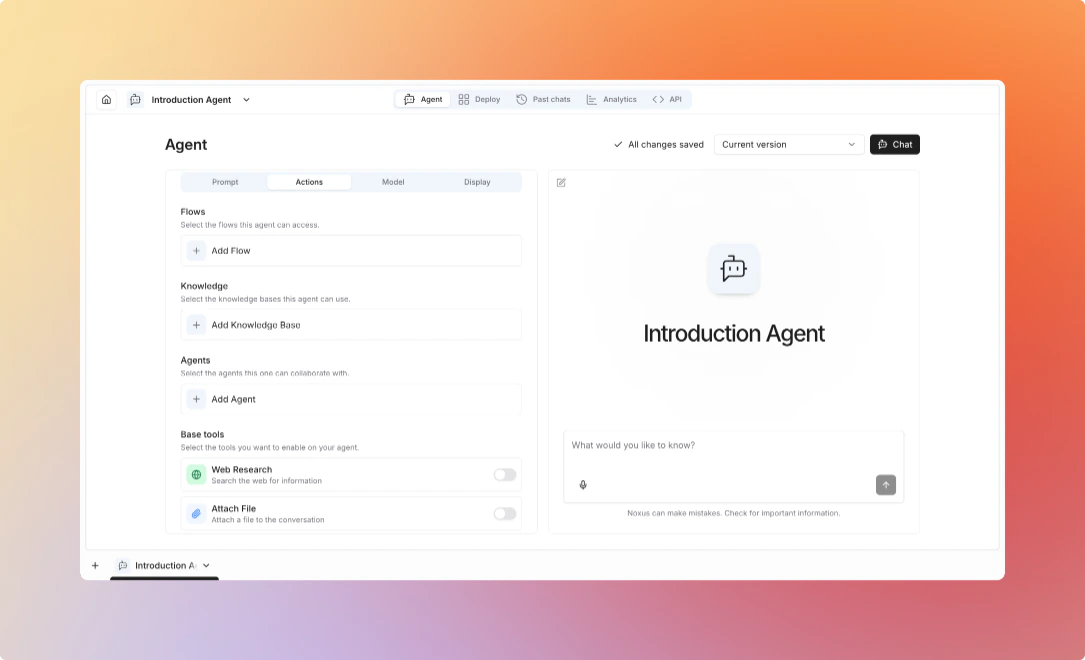 ## Available Tools
**Execute flows as tools within agent conversations**
**Use Cases:**
* Execute business logic
* Integrate with external systems
* Perform complex calculations
* Trigger automated workflows
**Configuration:**
* Select which flows the agent can access
* Map flow inputs to conversation context
**When to Enable:**
Enable flow tools when the agent needs to:
* Perform specific, well-defined operations
* Execute complex multi-node workflows
* Interact with external systems
* Process files or documents
Create focused flows for specific tasks, then give agents access to them.
**Example:**
```
Agent: "I'll look up that customer information for you."
→ Executes "Get Customer Info" flow
→ Receives customer data
Agent: "Here's what I found about that customer..."
```
**Search knowledge bases for information**
**Use Cases:**
* Answer questions from documents
* Access product documentation
* Find historical information
* Provide cited responses
**Configuration:**
* Select which knowledge bases to search
* Set retrieval limits
* Define search conditions
**When to Enable:**
Enable KB search when the agent needs to:
* Answer questions based on your documents
* Retrieve domain-specific information
* Provide accurate, grounded responses
* Cite sources
Organize knowledge bases by domain (Product Docs, Company Policies, Support Articles).
**Example:**
```
User: "What's our refund policy?"
Agent: Searches knowledge base
Agent: "According to our policy document, customers can request refunds within 30 days..."
```
**Search the web for current information**
**Use Cases:**
* Find recent news and updates
* Research public information
* Verify facts and data
* Gather competitive intelligence
**Configuration:**
* Enable/disable web research
* Set search result limits
* Configure source filtering
**When to Enable:**
Enable web research when the agent needs:
* Current information not in knowledge bases
* Real-time data (stock prices, news, etc.)
* Information from public sources
* Broad research across multiple sites
Web research is slower and less reliable than knowledge bases. Use for supplemental information.
**Example:**
```
User: "What are the latest AI trends?"
Agent: Searches web
Agent: "Based on recent articles, the top AI trends include..."
```
**Escalate to humans for guidance or approval**
**Use Cases:**
* Get approval for critical actions
* Ask for clarification
* Escalate complex issues
* Collect additional information
**Configuration:**
* Define escalation criteria
* Set timeout policies
* Configure notification channels
**When to Enable:**
Enable HITL when the agent should:
* Get approval for critical actions
* Ask for clarification on ambiguous requests
* Escalate complex issues
* Collect additional information
Use HITL as a safety net for high-stakes decisions.
**Example:**
```
Agent: "This request requires manager approval."
→ Sends notification to human
→ Waits for response
Agent: "Your manager has approved the request. Proceeding..."
```
Learn how to deploy and manage agents
## Available Tools
**Execute flows as tools within agent conversations**
**Use Cases:**
* Execute business logic
* Integrate with external systems
* Perform complex calculations
* Trigger automated workflows
**Configuration:**
* Select which flows the agent can access
* Map flow inputs to conversation context
**When to Enable:**
Enable flow tools when the agent needs to:
* Perform specific, well-defined operations
* Execute complex multi-node workflows
* Interact with external systems
* Process files or documents
Create focused flows for specific tasks, then give agents access to them.
**Example:**
```
Agent: "I'll look up that customer information for you."
→ Executes "Get Customer Info" flow
→ Receives customer data
Agent: "Here's what I found about that customer..."
```
**Search knowledge bases for information**
**Use Cases:**
* Answer questions from documents
* Access product documentation
* Find historical information
* Provide cited responses
**Configuration:**
* Select which knowledge bases to search
* Set retrieval limits
* Define search conditions
**When to Enable:**
Enable KB search when the agent needs to:
* Answer questions based on your documents
* Retrieve domain-specific information
* Provide accurate, grounded responses
* Cite sources
Organize knowledge bases by domain (Product Docs, Company Policies, Support Articles).
**Example:**
```
User: "What's our refund policy?"
Agent: Searches knowledge base
Agent: "According to our policy document, customers can request refunds within 30 days..."
```
**Search the web for current information**
**Use Cases:**
* Find recent news and updates
* Research public information
* Verify facts and data
* Gather competitive intelligence
**Configuration:**
* Enable/disable web research
* Set search result limits
* Configure source filtering
**When to Enable:**
Enable web research when the agent needs:
* Current information not in knowledge bases
* Real-time data (stock prices, news, etc.)
* Information from public sources
* Broad research across multiple sites
Web research is slower and less reliable than knowledge bases. Use for supplemental information.
**Example:**
```
User: "What are the latest AI trends?"
Agent: Searches web
Agent: "Based on recent articles, the top AI trends include..."
```
**Escalate to humans for guidance or approval**
**Use Cases:**
* Get approval for critical actions
* Ask for clarification
* Escalate complex issues
* Collect additional information
**Configuration:**
* Define escalation criteria
* Set timeout policies
* Configure notification channels
**When to Enable:**
Enable HITL when the agent should:
* Get approval for critical actions
* Ask for clarification on ambiguous requests
* Escalate complex issues
* Collect additional information
Use HITL as a safety net for high-stakes decisions.
**Example:**
```
Agent: "This request requires manager approval."
→ Sends notification to human
→ Waits for response
Agent: "Your manager has approved the request. Proceeding..."
```
Learn how to deploy and manage agents