> ## Documentation Index
> Fetch the complete documentation index at: https://docs.noxus.ai/llms.txt
> Use this file to discover all available pages before exploring further.
# Nodes
> Unified reference for core node categories in Noxus
## What are Nodes?
Nodes are the building blocks of flows. Each node performs a specific function, defines typed inputs/outputs, and can be composed to create reliable automations. Nodes are organized by capability so you can quickly find the right tool for the job.
The examples below showcase common nodes in each category. Many more nodes are available in the platform.
## Data & Files
Data & Files nodes transform, extract, and generate content from files and data.
**Example Nodes:** File to Text, Text to File, Download File, Merge Files
**What They Do:**
* Extract text from PDFs, Word docs, and other file formats
* Generate files from text or data
* Download files from URLs
* Combine multiple files into archives
**Use Case Example:**
Use OCR to extract text from scanned invoice images, read and parse invoice data (amounts, dates, vendors), then analyze for expense reporting.
**Example Nodes:** File to Base64, File to Path
**What They Do:**
* Convert files to Base64 encoding for API transmission
* Get file paths for local file operations
* Transform data formats for compatibility
**Use Case Example:**
Convert an image file to Base64 to include it directly in API requests or email bodies.
**Example Nodes:** Overlay Image on PDF, Fill File Template, Fill Excel Template, PDF Form Filler
**What They Do:**
* Fill document templates with dynamic data
* Add images, signatures, or watermarks to PDFs
* Populate Excel templates with calculated values
* Complete PDF forms programmatically
**Use Case Example:**
Generate personalized contracts by filling a Word template with customer data, then convert to PDF with company logo overlay.
**Example Nodes:** Read Webpage, Make API Request, Browser Playbook
**What They Do:**
* Scrape content from web pages
* Call external APIs with custom parameters
* Fetch data from web services
* Record and replay multi-step browser automations
* Integrate with third-party platforms
**Use Case Example:**
Fetch product pricing from competitor websites, then call your internal API to update pricing strategy.
The **Browser Playbook** node has its own guide — see [Browser Playbook](/platform/flows/browser-playbook) for recording, configuration, inputs/outputs, and examples.
**Example Nodes:** Run Code
**What They Do:**
* Execute custom Python code within flows
* Implement complex calculations or logic
* Use external Python libraries
* Process data with custom algorithms
**Use Case Example:**
Run a custom Python script to analyze sales data using pandas and generate statistical insights.
## Logic & Control
Logic & Control nodes route, filter, and transform data to shape execution.
**Example Nodes:** Condition
**What They Do:**
* Create if/then branching logic
* Route data based on conditions
* Filter items based on criteria
* Make decisions using AI or rules
**Use Case Example:**
Route support tickets to different teams based on priority: high-priority to urgent queue, others to standard queue.
**Example Nodes:** Filter List Values, List to Single Value, Single Value to List, Count List Items
**What They Do:**
* Filter lists based on conditions
* Convert between single values and lists
* Count items in collections
* Aggregate and summarize data
**Use Case Example:**
Filter a list of customer emails to find only those from gmail.com domains, then count how many were found.
**Example Nodes:** Join Paths, Extract from Structured
**What They Do:**
* Merge multiple execution paths
* Extract specific fields from JSON or objects
* Synchronize parallel operations
* Manage complex flow routing
**Use Case Example:**
Run two API calls in parallel, wait for both to complete with Join Paths, then extract specific fields from each response.
**Example Nodes:** Combine Text, Extract Fields, Merge File and Text, Markdown to HTML
**What They Do:**
* Concatenate multiple text strings
* Extract structured data from text using AI
* Combine file content with additional text
* Convert markdown to HTML format
**Use Case Example:**
Combine customer name, order number, and shipping address into a formatted tracking email body.
## AI Processing
AI Processing nodes understand and generate content using language and vision models.
**Example Nodes:** Generate Text, Generate Fields, Categorizer
**What They Do:**
* Generate human-like text from prompts
* Extract structured data from unstructured text
* Classify content into categories
* Complete forms or templates intelligently
**Use Case Example:**
Analyze customer review text, categorize sentiment (positive/negative/neutral), and extract key product mentions.
**Example Nodes:** Interpret Image, Generate Image, Transform Image, Interpret Audio
**What They Do:**
* Analyze and describe image content
* Generate images from text descriptions
* Edit or transform images
* Transcribe and analyze audio
**Use Case Example:**
Process receipt images to extract line items, amounts, and vendor information for expense reporting.
**Example Nodes:** Agent, Web Research
**What They Do:**
* Perform multi-step reasoning tasks
* Use tools and integrations autonomously
* Research topics using web search
* Execute complex decision-making workflows
**Use Case Example:**
Research a company using web search, extract key information, check it against your CRM, and prepare a summary report.
**Example Nodes:** Summarizer, Smart Route, Enrich Company
**What They Do:**
* Summarize long documents or text
* Intelligently route data to different paths using AI
* Enrich company data with public information
* Perform domain-specific analysis
**Use Case Example:**
Read a lengthy industry report, summarize key findings, and enrich mentioned companies with revenue and employee data.
## Integrations
Integration nodes connect your flows to external services and platforms. Each integration node requires authentication configuration and provides specialized functionality for its respective service.
**Common Integration Examples:**
* **Communication:** Send Email, Read Email, Slack, Teams
* **Storage:** Google Drive, Dropbox, OneDrive
* **CRM:** Salesforce, HubSpot
* **Productivity:** Calendar, Tasks, Sheets
**Use Case Example:**
When a new lead is added to Salesforce, automatically send a welcome email via Gmail and create a task in your project management tool.
Integrations have a dedicated section in the documentation. Learn more about [available integrations](/platform/flows/integrations) and how to configure them.
## Subflows
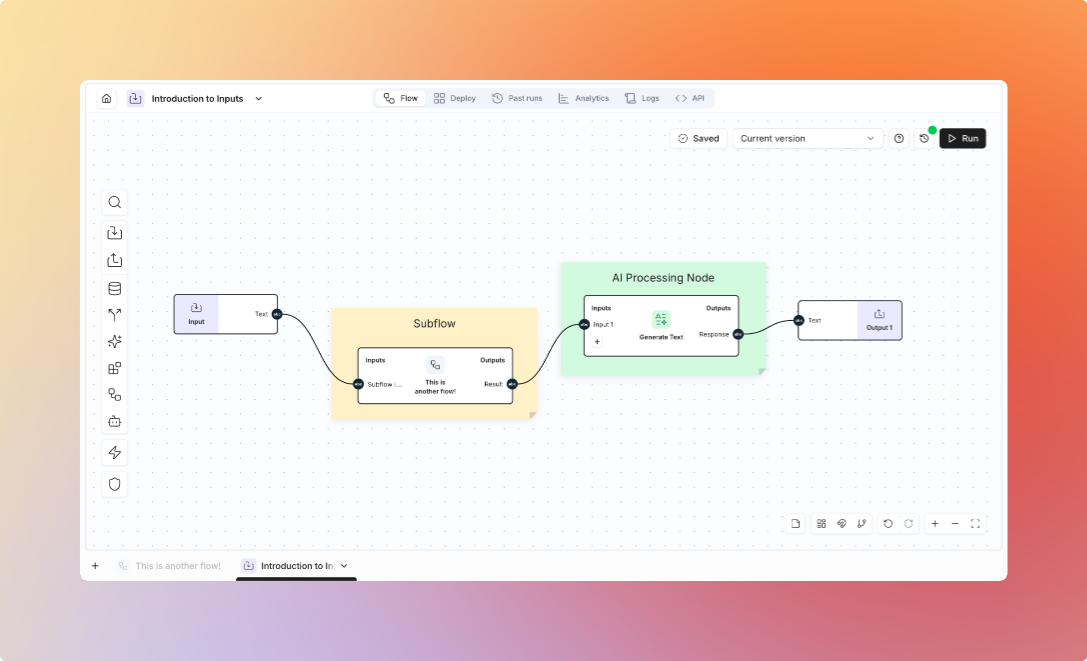
Subflows are reusable flows that function as single nodes within other flows. They encapsulate complex logic into modular building blocks, enabling you to build maintainable and scalable automation.
 **Key Benefits:**
* Reuse common logic across multiple flows
* Simplify complex flows by breaking them into smaller components
* Maintain consistency through centralized updates
* Test and debug isolated functionality independently
**How They Work:**
Subflows define their own inputs and outputs, just like regular flows. When used as a node in another flow, they appear with input connectors matching their defined inputs and output connectors for their results. Any changes to a subflow automatically propagate to all flows using it.
**Use Case Example:**
Create a "Customer Validation" subflow that checks email format, validates phone numbers, and looks up existing records. Use this subflow in multiple flows (signup, checkout, profile update) to maintain consistent validation logic.
Create a subflow by building a regular flow and marking it as reusable. It will then appear in your node catalog under the Subflows category.
## Next Steps
* Explore [Inputs & Outputs](/platform/flows/inputs-outputs)
* Learn about [Integrations](/platform/flows/integrations)
* See [Triggers](/platform/flows/triggers)
**Key Benefits:**
* Reuse common logic across multiple flows
* Simplify complex flows by breaking them into smaller components
* Maintain consistency through centralized updates
* Test and debug isolated functionality independently
**How They Work:**
Subflows define their own inputs and outputs, just like regular flows. When used as a node in another flow, they appear with input connectors matching their defined inputs and output connectors for their results. Any changes to a subflow automatically propagate to all flows using it.
**Use Case Example:**
Create a "Customer Validation" subflow that checks email format, validates phone numbers, and looks up existing records. Use this subflow in multiple flows (signup, checkout, profile update) to maintain consistent validation logic.
Create a subflow by building a regular flow and marking it as reusable. It will then appear in your node catalog under the Subflows category.
## Next Steps
* Explore [Inputs & Outputs](/platform/flows/inputs-outputs)
* Learn about [Integrations](/platform/flows/integrations)
* See [Triggers](/platform/flows/triggers)