> ## Documentation Index
> Fetch the complete documentation index at: https://docs.noxus.ai/llms.txt
> Use this file to discover all available pages before exploring further.
# Triggers
> Automation catalysts that initiate flows based on events, schedules, and external signals
## What are Triggers?
Triggers are the automation catalysts that initiate flow execution based on various events, schedules, and external signals. They transform reactive flows into proactive automation systems by monitoring for specific conditions and automatically starting flows when those conditions are met.
Triggers bridge the gap between manual flow execution and fully automated
systems, enabling flows to respond to real-world events, time-based schedules,
and external system changes without human intervention.
## Available Trigger Types
| Trigger Category | Example Triggers | Primary Functions |
| :------------------ | :---------------------------------------- | :------------------------------------------------------------------ |
| **Schedule-Based** | Schedule (Hourly, Daily, Weekly, Monthly) | Recurring automation, periodic processing, scheduled tasks |
| **Communication** | Slack, Teams, Gmail | Message-driven automation, communication flow triggers |
| **File Monitoring** | Google Drive, OneDrive | File change detection, document processing automation |
| **Web Integration** | Webhook | Real-time response, external system integration, instant processing |
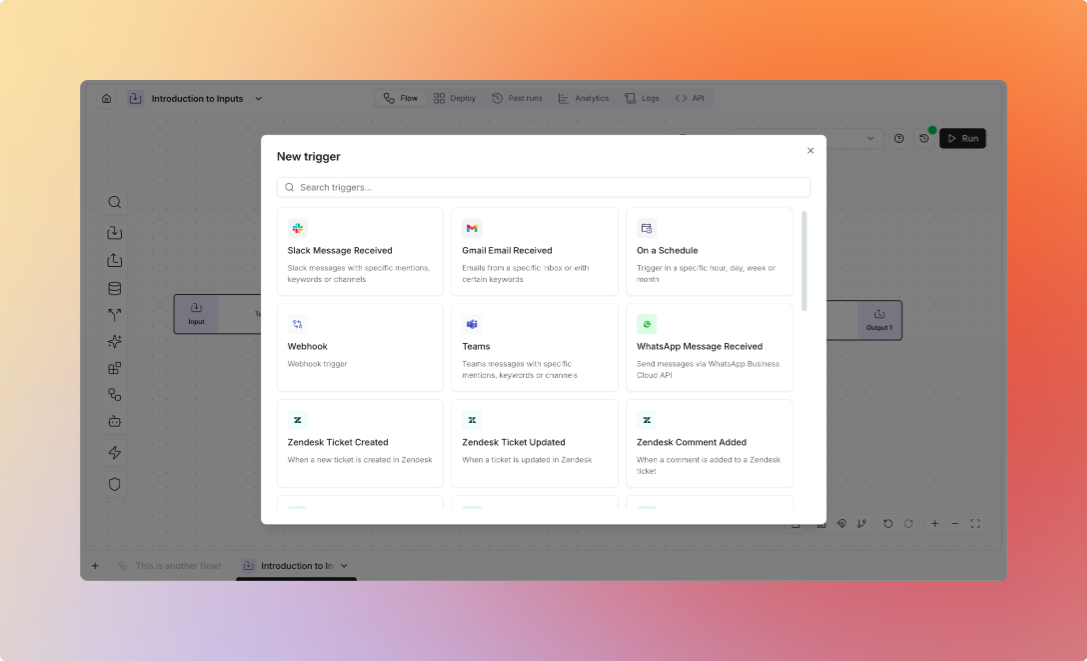 Triggers require a saved flow version to function. You must save a version of your flow before creating or connecting a trigger. Each trigger is associated with a specific flow version, ensuring consistent execution behavior.
## Core Capabilities
**Schedule-Based Automation** - Configure flows to run automatically on specific schedules including hourly, daily, weekly, and monthly intervals. Support for custom timing, timezone handling, and flexible scheduling patterns to match business requirements.
Schedule triggers handle timezone conversions, daylight saving transitions,
and business day scheduling automatically, ensuring reliable recurring
automation across different time zones and calendar requirements.
**Real-time Event Processing** - Instant flow execution in response to external events through webhooks, platform notifications, and system signals. Enable immediate automation scenarios, notifications, and responsive system behavior.
**Platform Integration Monitoring** - Monitor communication platforms like Slack, Teams, and Gmail for messages, mentions, and events. Track file system changes in Google Drive and OneDrive for document processing automation.
**Advanced Event Filtering** - Apply conditions and filters to triggers, ensuring flows only execute when specific criteria are met. Support for complex logic, data validation, and contextual decision-making with built-in security and validation.
Trigger execution frequency and capabilities may be subject to rate limits
imposed by external platforms. Ensure proper error handling and monitoring for
robust automation flows.
## Next Steps
* Learn about [Inputs & Outputs](/platform/flows/inputs-outputs)
* Explore [Flow Design](/core/concepts/flows)
* Understand [Platform Automation](/platform/flows/automation)
* Check out the [Platform](/platform/introduction)
Triggers require a saved flow version to function. You must save a version of your flow before creating or connecting a trigger. Each trigger is associated with a specific flow version, ensuring consistent execution behavior.
## Core Capabilities
**Schedule-Based Automation** - Configure flows to run automatically on specific schedules including hourly, daily, weekly, and monthly intervals. Support for custom timing, timezone handling, and flexible scheduling patterns to match business requirements.
Schedule triggers handle timezone conversions, daylight saving transitions,
and business day scheduling automatically, ensuring reliable recurring
automation across different time zones and calendar requirements.
**Real-time Event Processing** - Instant flow execution in response to external events through webhooks, platform notifications, and system signals. Enable immediate automation scenarios, notifications, and responsive system behavior.
**Platform Integration Monitoring** - Monitor communication platforms like Slack, Teams, and Gmail for messages, mentions, and events. Track file system changes in Google Drive and OneDrive for document processing automation.
**Advanced Event Filtering** - Apply conditions and filters to triggers, ensuring flows only execute when specific criteria are met. Support for complex logic, data validation, and contextual decision-making with built-in security and validation.
Trigger execution frequency and capabilities may be subject to rate limits
imposed by external platforms. Ensure proper error handling and monitoring for
robust automation flows.
## Next Steps
* Learn about [Inputs & Outputs](/platform/flows/inputs-outputs)
* Explore [Flow Design](/core/concepts/flows)
* Understand [Platform Automation](/platform/flows/automation)
* Check out the [Platform](/platform/introduction)