> ## Documentation Index
> Fetch the complete documentation index at: https://docs.noxus.ai/llms.txt
> Use this file to discover all available pages before exploring further.
# Managing Through Flows
> Automate knowledge base operations with flows
Use flows to automate knowledge base ingestion, querying, and management.
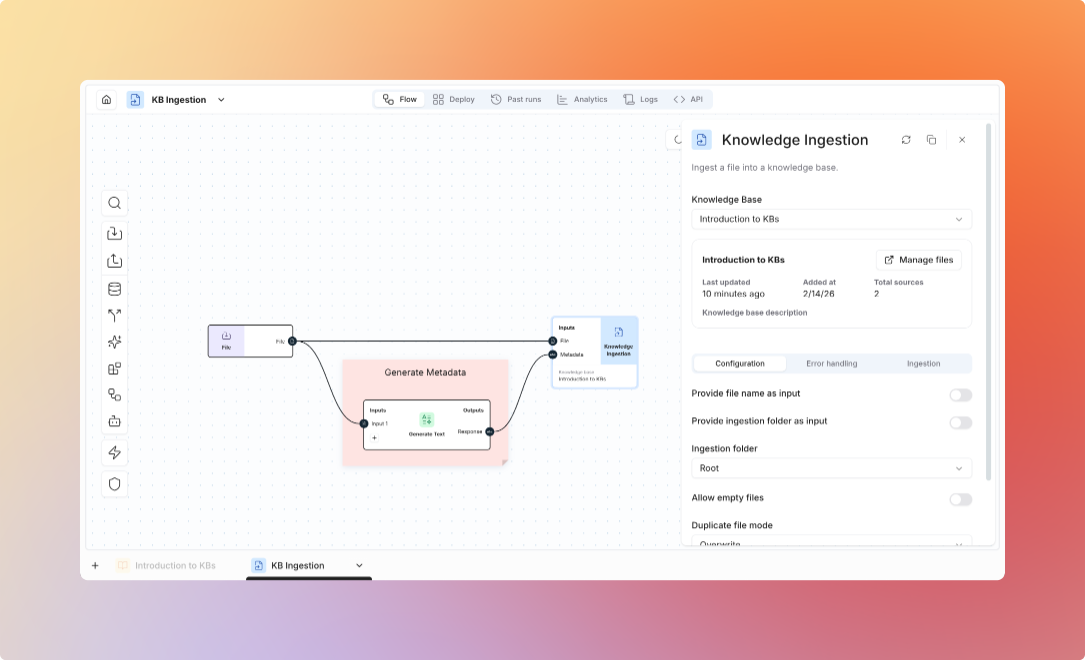 ## Knowledge Base Nodes
Upload documents to knowledge bases from flows.
**Use Cases:**
* Automated document ingestion
* Email attachment processing
* Scheduled batch uploads
* ETL pipelines
**Configuration:**
* Knowledge base selection
* Target folder
* Metadata assignment
* Processing options
**Example Flow:**
```
Email Trigger
→ Extract Attachments
→ Filter PDFs
→ Knowledge Ingestion Node (upload to "Customer Inquiries")
→ Send Confirmation Email
```
Query knowledge bases with AI-powered answers.
**Use Cases:**
* Automated question answering
* Document-based decision making
* Information extraction
* Report generation
**Configuration:**
* Knowledge base selection
* Query input
* Folder filter (optional)
* Retrieval settings (top-K, threshold)
* Model selection
**Example Flow:**
```
API Trigger (customer question)
→ KB Q&A (search Product Docs)
→ Format Response
→ Return Answer with Citations
```
Get raw chunks without AI generation.
**Use Cases:**
* Custom processing of retrieved content
* Relevance search only
* Building custom RAG pipelines
* Advanced analysis workflows
**Configuration:**
* Knowledge base selection
* Search method (semantic, keyword, hybrid)
* Number of chunks
* Return metadata
**Example Flow:**
```
User Query
→ Knowledge Retriever Node (get relevant chunks)
→ Custom Analysis Node
→ Generate Custom Response
→ Return Result
```
## Common Patterns
**Pattern: Email to Knowledge Base**
```
Email Trigger
→ Extract Attachments
→ Filter Documents
→ Knowledge Ingestion Node
→ Send Confirmation
```
**Use Case:** Automatically add customer support emails to knowledge base
**Configuration:**
* Email integration trigger
* File type filtering
* Folder organization by sender/topic
* Notification on completion
**Pattern: Process and Index**
```
Scheduled Trigger
→ Download from Drive
→ Extract Text
→ Clean & Format
→ Knowledge Ingestion Node
→ Update Index
```
**Use Case:** Daily sync of documents from Google Drive
**Configuration:**
* Schedule (daily, hourly, etc.)
* Drive folder selection
* Text cleaning rules
* Knowledge base folder mapping
**Pattern: Route by Content**
```
New Document
→ Analyze Content
→ Condition (Document Type?)
→ Technical: Upload to Tech KB
→ Policy: Upload to Policy KB
→ Marketing: Upload to Marketing KB
```
**Use Case:** Automatically categorize and route documents to appropriate knowledge bases
**Configuration:**
* Content classification
* Multiple knowledge base targets
* Folder assignment rules
* Metadata tagging
**Pattern: Query and Act**
```
User Request
→ KB Q&A
→ Condition (Answer Found?)
→ Yes: Return Answer
→ No: Escalate to Human
```
**Use Case:** Answer questions from knowledge base, escalate if no answer found
**Configuration:**
* Confidence threshold
* Escalation criteria
* Fallback responses
* Human notification
## Advanced Workflows
Search across multiple knowledge bases:
```
User Query
→ KB Q&A (Product Docs)
→ KB Q&A (Support Articles)
→ KB Q&A (Community Forums)
→ Synthesize Results
→ Generate Comprehensive Answer
```
**Use Case:** Comprehensive answers from multiple sources
Update knowledge base with new information:
```
Scheduled Trigger (daily)
→ Fetch New Documents (API)
→ Check for Duplicates
→ Knowledge Ingestion Node (new docs only)
→ Log Update Summary
```
**Use Case:** Keep knowledge base current with latest information
## Integration Examples
```
Slack Message Trigger
→ Extract Question
→ KB Q&A (Company Knowledge)
→ Format for Slack
→ Post Response
→ Track Satisfaction
```
```
New Ticket Trigger
→ Extract Issue Description
→ KB Q&A (Support Articles)
→ If Answer Found:
→ Post Solution to Ticket
→ Mark as Resolved
→ If No Answer:
→ Assign to Agent
→ Tag as "Needs Documentation"
```
```
Content Request
→ KB Q&A (gather information)
→ Generate Text (create draft)
→ KB Q&A (verify facts)
→ Human Review
→ Publish Content
```
## Best Practices
* Batch uploads when possible
* Use appropriate folder structure
* Add meaningful metadata
* Validate documents before upload
* Test queries with different settings
* Monitor retrieval quality
* Adjust thresholds based on results
* Cache frequent queries
* Regular cleanup of outdated documents
* Monitor storage usage
* Update documents when source changes
* Track query performance
* Handle upload failures gracefully
* Retry with exponential backoff
* Log errors for debugging
* Notify on critical failures
View all supported file formats
## Knowledge Base Nodes
Upload documents to knowledge bases from flows.
**Use Cases:**
* Automated document ingestion
* Email attachment processing
* Scheduled batch uploads
* ETL pipelines
**Configuration:**
* Knowledge base selection
* Target folder
* Metadata assignment
* Processing options
**Example Flow:**
```
Email Trigger
→ Extract Attachments
→ Filter PDFs
→ Knowledge Ingestion Node (upload to "Customer Inquiries")
→ Send Confirmation Email
```
Query knowledge bases with AI-powered answers.
**Use Cases:**
* Automated question answering
* Document-based decision making
* Information extraction
* Report generation
**Configuration:**
* Knowledge base selection
* Query input
* Folder filter (optional)
* Retrieval settings (top-K, threshold)
* Model selection
**Example Flow:**
```
API Trigger (customer question)
→ KB Q&A (search Product Docs)
→ Format Response
→ Return Answer with Citations
```
Get raw chunks without AI generation.
**Use Cases:**
* Custom processing of retrieved content
* Relevance search only
* Building custom RAG pipelines
* Advanced analysis workflows
**Configuration:**
* Knowledge base selection
* Search method (semantic, keyword, hybrid)
* Number of chunks
* Return metadata
**Example Flow:**
```
User Query
→ Knowledge Retriever Node (get relevant chunks)
→ Custom Analysis Node
→ Generate Custom Response
→ Return Result
```
## Common Patterns
**Pattern: Email to Knowledge Base**
```
Email Trigger
→ Extract Attachments
→ Filter Documents
→ Knowledge Ingestion Node
→ Send Confirmation
```
**Use Case:** Automatically add customer support emails to knowledge base
**Configuration:**
* Email integration trigger
* File type filtering
* Folder organization by sender/topic
* Notification on completion
**Pattern: Process and Index**
```
Scheduled Trigger
→ Download from Drive
→ Extract Text
→ Clean & Format
→ Knowledge Ingestion Node
→ Update Index
```
**Use Case:** Daily sync of documents from Google Drive
**Configuration:**
* Schedule (daily, hourly, etc.)
* Drive folder selection
* Text cleaning rules
* Knowledge base folder mapping
**Pattern: Route by Content**
```
New Document
→ Analyze Content
→ Condition (Document Type?)
→ Technical: Upload to Tech KB
→ Policy: Upload to Policy KB
→ Marketing: Upload to Marketing KB
```
**Use Case:** Automatically categorize and route documents to appropriate knowledge bases
**Configuration:**
* Content classification
* Multiple knowledge base targets
* Folder assignment rules
* Metadata tagging
**Pattern: Query and Act**
```
User Request
→ KB Q&A
→ Condition (Answer Found?)
→ Yes: Return Answer
→ No: Escalate to Human
```
**Use Case:** Answer questions from knowledge base, escalate if no answer found
**Configuration:**
* Confidence threshold
* Escalation criteria
* Fallback responses
* Human notification
## Advanced Workflows
Search across multiple knowledge bases:
```
User Query
→ KB Q&A (Product Docs)
→ KB Q&A (Support Articles)
→ KB Q&A (Community Forums)
→ Synthesize Results
→ Generate Comprehensive Answer
```
**Use Case:** Comprehensive answers from multiple sources
Update knowledge base with new information:
```
Scheduled Trigger (daily)
→ Fetch New Documents (API)
→ Check for Duplicates
→ Knowledge Ingestion Node (new docs only)
→ Log Update Summary
```
**Use Case:** Keep knowledge base current with latest information
## Integration Examples
```
Slack Message Trigger
→ Extract Question
→ KB Q&A (Company Knowledge)
→ Format for Slack
→ Post Response
→ Track Satisfaction
```
```
New Ticket Trigger
→ Extract Issue Description
→ KB Q&A (Support Articles)
→ If Answer Found:
→ Post Solution to Ticket
→ Mark as Resolved
→ If No Answer:
→ Assign to Agent
→ Tag as "Needs Documentation"
```
```
Content Request
→ KB Q&A (gather information)
→ Generate Text (create draft)
→ KB Q&A (verify facts)
→ Human Review
→ Publish Content
```
## Best Practices
* Batch uploads when possible
* Use appropriate folder structure
* Add meaningful metadata
* Validate documents before upload
* Test queries with different settings
* Monitor retrieval quality
* Adjust thresholds based on results
* Cache frequent queries
* Regular cleanup of outdated documents
* Monitor storage usage
* Update documents when source changes
* Track query performance
* Handle upload failures gracefully
* Retry with exponential backoff
* Log errors for debugging
* Notify on critical failures
View all supported file formats