> ## Documentation Index
> Fetch the complete documentation index at: https://docs.noxus.ai/llms.txt
> Use this file to discover all available pages before exploring further.
# Supported Files & Integrations
> File formats and data sources for knowledge bases
Knowledge Bases support a wide range of file formats and can sync content from cloud storage integrations.
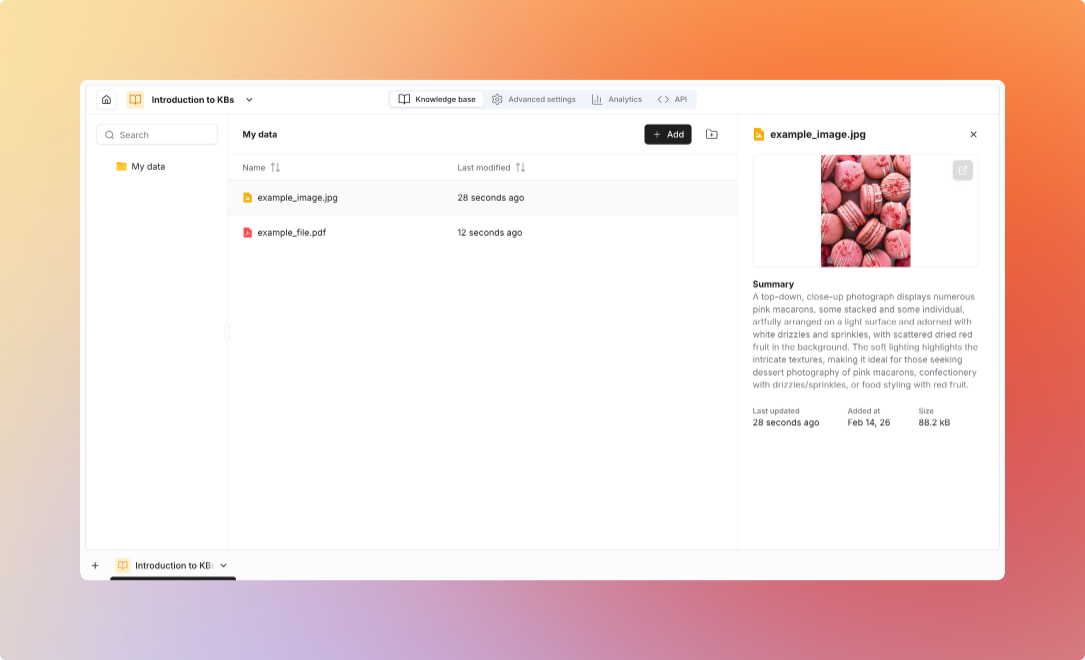 ## Supported File Formats
| Format | Extensions | Features |
| :------------- | :---------- | :------------------------------------------------------------------------------------- |
| **PDF** | .pdf | Full text extraction, image processing, page-level tracking, OCR for scanned documents |
| **Word** | .docx, .doc | Text and formatting preservation, table extraction |
| **Plain Text** | .txt, .md | Direct ingestion, markdown rendering |
| **HTML** | .html, .htm | Web pages and formatted content, link preservation |
| **Rich Text** | .rtf | Formatted text documents |
| Format | Extensions | Features |
| :-------- | :---------- | :----------------------------------------------------- |
| **Excel** | .xlsx, .xls | Per-sheet processing, table extraction, formula values |
| **CSV** | .csv | Tabular data ingestion, header detection |
| Format | Extensions | Features |
| :------------- | :---------- | :----------------------------------------------------- |
| **PowerPoint** | .pptx, .ppt | Slide text extraction, speaker notes, image processing |
| Format | Extensions | Features |
| :--------------- | :----------------------- | :-------------------------------------------------------------------- |
| **Images** | .png, .jpg, .jpeg, .webp | OCR text extraction, vision-based understanding, chart interpretation |
| **Scanned PDFs** | .pdf | Automatic OCR or vision model processing |
| Format | Extensions | Features |
| :-------- | :--------- | :----------------------------------------------------------------------- |
| **ZIP** | .zip | Extract and process all contents, maintain folder structure |
| **Email** | .eml | Email messages with metadata, attachment processing, thread preservation |
## Cloud Storage Integrations
**Features:**
* Connect to Google Drive
* Select folders to import
* Import files from selected folders
* Preserve folder structure
**Setup:**
1. Connect Google Drive integration
2. Select folders to import
3. Import files into knowledge base
Files are imported at the time of selection. They do not automatically sync when updated in Google Drive.
**Features:**
* Connect to OneDrive or SharePoint
* Select document libraries or folders
* Import files from selected locations
* Preserve folder structure
**Setup:**
1. Connect OneDrive/SharePoint integration
2. Select folders or document libraries
3. Import files into knowledge base
Files are imported at the time of selection. They do not automatically sync when updated in OneDrive or SharePoint.
**Features:**
* Crawl entire websites
* Follow links automatically
* Extract clean text
* Preserve page structure
* Schedule regular updates
**Setup:**
1. Provide starting URL
2. Configure crawl depth
3. Set URL patterns to include/exclude
4. Schedule refresh frequency
## Upload Methods
**Via Platform UI:**
* Drag-and-drop files
* Bulk upload multiple files
* Organize into folders
* Add metadata tags
Supports individual files, multiple files at once, and ZIP archives (auto-extracted)
**Programmatic upload via REST API:**
```bash theme={null}
curl -X POST https://api.noxus.ai/v1/knowledge-bases/kb_123/documents \
-H "Authorization: Bearer ${API_KEY}" \
-F "file=@document.pdf" \
-F "folder=Product Docs"
```
**Upload via Python SDK:**
```python theme={null}
from noxus_sdk.client import Client
client = Client(api_key="your_api_key")
kb = client.knowledge_bases.get("kb_123")
kb.upload_document(
file_path="document.pdf",
folder="Product Docs",
metadata={"author": "John Doe", "version": "2.0"}
)
```
**Automate uploads with flows:**
**Use Cases:**
* Automate document ingestion
* Process email attachments
* Sync from external sources
* Scheduled batch uploads
## Metadata
**Automatically captured:**
| Field | Description |
| :-------------- | :---------------------- |
| Filename | Original file name |
| Upload date | When document was added |
| File size | Document size in bytes |
| Page count | Number of pages (PDFs) |
| Folder location | Organization path |
**Add your own fields:**
**Common Fields:**
* Author, Department, Document type
* Version, Tags/categories
* Creation date, Expiration date
**Use Cases:**
* Filter searches by metadata
* Organize documents
* Track document lifecycle
* Enable advanced queries
Configure search methods and retrieval settings
## Supported File Formats
| Format | Extensions | Features |
| :------------- | :---------- | :------------------------------------------------------------------------------------- |
| **PDF** | .pdf | Full text extraction, image processing, page-level tracking, OCR for scanned documents |
| **Word** | .docx, .doc | Text and formatting preservation, table extraction |
| **Plain Text** | .txt, .md | Direct ingestion, markdown rendering |
| **HTML** | .html, .htm | Web pages and formatted content, link preservation |
| **Rich Text** | .rtf | Formatted text documents |
| Format | Extensions | Features |
| :-------- | :---------- | :----------------------------------------------------- |
| **Excel** | .xlsx, .xls | Per-sheet processing, table extraction, formula values |
| **CSV** | .csv | Tabular data ingestion, header detection |
| Format | Extensions | Features |
| :------------- | :---------- | :----------------------------------------------------- |
| **PowerPoint** | .pptx, .ppt | Slide text extraction, speaker notes, image processing |
| Format | Extensions | Features |
| :--------------- | :----------------------- | :-------------------------------------------------------------------- |
| **Images** | .png, .jpg, .jpeg, .webp | OCR text extraction, vision-based understanding, chart interpretation |
| **Scanned PDFs** | .pdf | Automatic OCR or vision model processing |
| Format | Extensions | Features |
| :-------- | :--------- | :----------------------------------------------------------------------- |
| **ZIP** | .zip | Extract and process all contents, maintain folder structure |
| **Email** | .eml | Email messages with metadata, attachment processing, thread preservation |
## Cloud Storage Integrations
**Features:**
* Connect to Google Drive
* Select folders to import
* Import files from selected folders
* Preserve folder structure
**Setup:**
1. Connect Google Drive integration
2. Select folders to import
3. Import files into knowledge base
Files are imported at the time of selection. They do not automatically sync when updated in Google Drive.
**Features:**
* Connect to OneDrive or SharePoint
* Select document libraries or folders
* Import files from selected locations
* Preserve folder structure
**Setup:**
1. Connect OneDrive/SharePoint integration
2. Select folders or document libraries
3. Import files into knowledge base
Files are imported at the time of selection. They do not automatically sync when updated in OneDrive or SharePoint.
**Features:**
* Crawl entire websites
* Follow links automatically
* Extract clean text
* Preserve page structure
* Schedule regular updates
**Setup:**
1. Provide starting URL
2. Configure crawl depth
3. Set URL patterns to include/exclude
4. Schedule refresh frequency
## Upload Methods
**Via Platform UI:**
* Drag-and-drop files
* Bulk upload multiple files
* Organize into folders
* Add metadata tags
Supports individual files, multiple files at once, and ZIP archives (auto-extracted)
**Programmatic upload via REST API:**
```bash theme={null}
curl -X POST https://api.noxus.ai/v1/knowledge-bases/kb_123/documents \
-H "Authorization: Bearer ${API_KEY}" \
-F "file=@document.pdf" \
-F "folder=Product Docs"
```
**Upload via Python SDK:**
```python theme={null}
from noxus_sdk.client import Client
client = Client(api_key="your_api_key")
kb = client.knowledge_bases.get("kb_123")
kb.upload_document(
file_path="document.pdf",
folder="Product Docs",
metadata={"author": "John Doe", "version": "2.0"}
)
```
**Automate uploads with flows:**
**Use Cases:**
* Automate document ingestion
* Process email attachments
* Sync from external sources
* Scheduled batch uploads
## Metadata
**Automatically captured:**
| Field | Description |
| :-------------- | :---------------------- |
| Filename | Original file name |
| Upload date | When document was added |
| File size | Document size in bytes |
| Page count | Number of pages (PDFs) |
| Folder location | Organization path |
**Add your own fields:**
**Common Fields:**
* Author, Department, Document type
* Version, Tags/categories
* Creation date, Expiration date
**Use Cases:**
* Filter searches by metadata
* Organize documents
* Track document lifecycle
* Enable advanced queries
Configure search methods and retrieval settings