> ## Documentation Index
> Fetch the complete documentation index at: https://docs.noxus.ai/llms.txt
> Use this file to discover all available pages before exploring further.
# Evaluators
> All available evaluator types for testing flow outputs
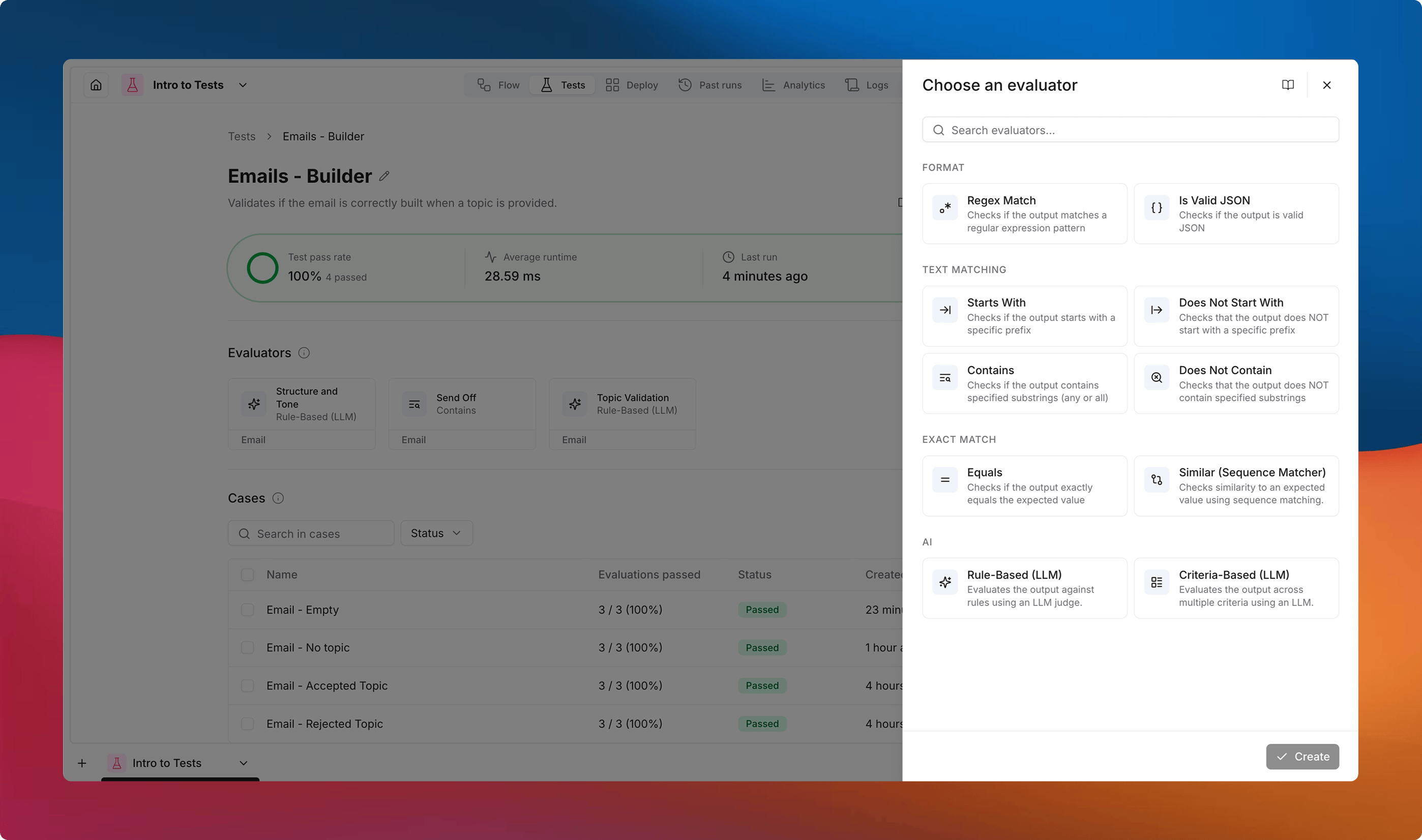
Evaluators are the rules that score your test case outputs. Each evaluator targets a specific output field from your flow and returns a pass/fail result with optional feedback.
You can attach multiple evaluators to a single test. When a case runs, every evaluator is applied independently, and the case passes only if **all** evaluators pass.
 ## Output Field Targeting
Every evaluator requires you to select an **output field** -- the specific output connector from your flow that the evaluator will inspect.
Only text outputs can be evaluated at this time. Non-text outputs (files, images, etc.) will not appear in the output field selector.
## Per-Case Overrides
Some evaluator settings act as **defaults** that can be overridden directly on individual test cases. This lets you reuse a single evaluator across many cases while customizing the expected value for each one.
When you open a case, overridable properties appear in the **Evaluator values** section of the case editor.
For example, an `Equals` evaluator might have a default expected value of `"Hello"`, but for a specific case you can override it to `"Goodbye"` without creating a separate evaluator.
Properties that support per-case overrides are marked with in the tables below.
### Using Dynamic Inputs and Outputs
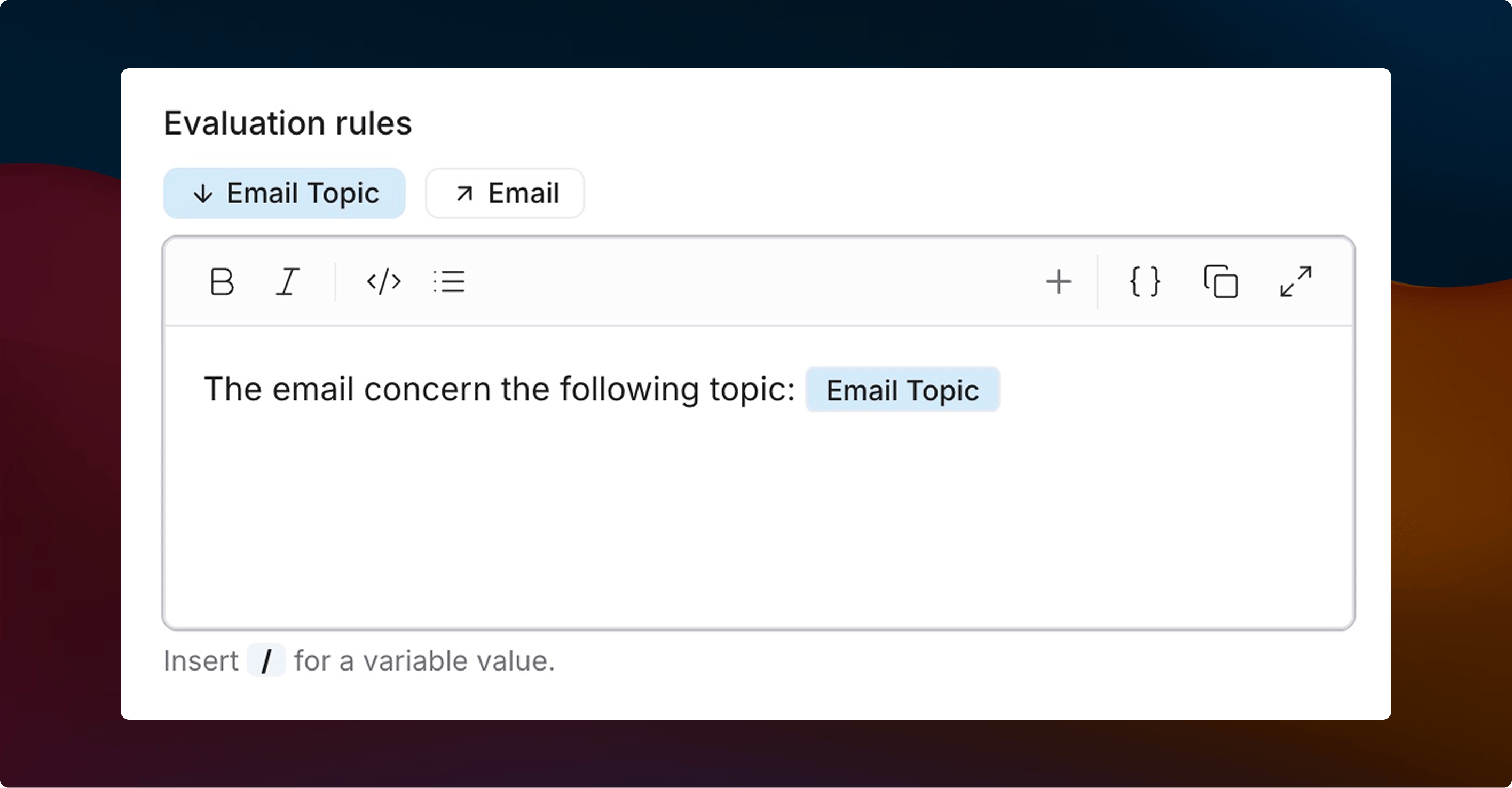
Some properties also support **dynamic references** to your flow's inputs and outputs. These can be inserted in a compatible field using `/` or the `Insert variable` option. They will be represented as chips.
* **Input** -- corresponds to the value of a flow input, as mapped in the case. Useful when the expected output should match or contain the original input.
* **Output** -- resolves to the actual value produced by the flow when the case is run. Useful when comparing one output against another.
This makes it possible to write evaluators like "the summary output should contain the customer name from the input" without hardcoding values.
The Inputs and Outputs values are case dependent.
## Output Field Targeting
Every evaluator requires you to select an **output field** -- the specific output connector from your flow that the evaluator will inspect.
Only text outputs can be evaluated at this time. Non-text outputs (files, images, etc.) will not appear in the output field selector.
## Per-Case Overrides
Some evaluator settings act as **defaults** that can be overridden directly on individual test cases. This lets you reuse a single evaluator across many cases while customizing the expected value for each one.
When you open a case, overridable properties appear in the **Evaluator values** section of the case editor.
For example, an `Equals` evaluator might have a default expected value of `"Hello"`, but for a specific case you can override it to `"Goodbye"` without creating a separate evaluator.
Properties that support per-case overrides are marked with in the tables below.
### Using Dynamic Inputs and Outputs
Some properties also support **dynamic references** to your flow's inputs and outputs. These can be inserted in a compatible field using `/` or the `Insert variable` option. They will be represented as chips.
* **Input** -- corresponds to the value of a flow input, as mapped in the case. Useful when the expected output should match or contain the original input.
* **Output** -- resolves to the actual value produced by the flow when the case is run. Useful when comparing one output against another.
This makes it possible to write evaluators like "the summary output should contain the customer name from the input" without hardcoding values.
The Inputs and Outputs values are case dependent.
 ## Deterministic Evaluators
These evaluators apply rule-based checks. They run instantly, produce consistent results, and do not consume model tokens.
### Regex
Matches the output against a regular expression pattern.
| Setting | Description | Default |
| -------------- | ----------------------------------------------------------- | ------- |
| **Pattern** | The regex pattern to match. | — |
| **Full match** | If enabled, the entire output must match the regex pattern. | Off |
### Is JSON
Validates that the output is a well-formed JSON object.
| Setting | Description | Default |
| ---------- | ------------------------------------------------------------------ | ------- |
| **Strict** | Enforce official JSON specifications while reading and validating. | On |
### Starts With
Checks whether the output begins with a given prefix.
| Setting | Description | Default |
| ------------------------------------------- | ------------------------------------------------------------------------- | ------- |
| **Prefix** | The string the output must start with. | — |
| **Case sensitive** | Whether uppercase and lowercase letters are treated as different (A ≠ a). | Off |
### Does Not Start With
Verifies the output does not begin with a given prefix.
| Setting | Description | Default |
| ------------------------------------------- | ------------------------------------------------------------------------- | ------- |
| **Prefix** | The string the output must not start with. | — |
| **Case sensitive** | Whether uppercase and lowercase letters are treated as different (A ≠ a). | Off |
### Contains
Checks whether the output contains one or more substrings.
| Setting | Description | Default |
| ----------------------------------------------- | ------------------------------------------------------------------------- | ------- |
| **Substrings** | List of strings to search for in the output. | — |
| **Case sensitive** | Whether uppercase and lowercase letters are treated as different (A ≠ a). | Off |
| **Require all** | Every substring must be present for the evaluator to pass. | Off |
### Does Not Contain
The inverse of Contains -- verifies that certain substrings are absent from the output.
| Setting | Description | Default |
| ----------------------------------------------- | ------------------------------------------------------------------------- | ------- |
| **Substrings** | List of strings that should not appear in the output. | — |
| **Case sensitive** | Whether uppercase and lowercase letters are treated as different (A ≠ a). | Off |
| **Require all** | None of the substrings can be present for the evaluator to pass. | Off |
### Equals
Checks whether the output exactly matches an expected string.
| Setting | Description | Default |
| --------------------------------------------------- | ------------------------------------------------------------------------- | ------- |
| **Expected value** | The string the output must match. | — |
| **Case sensitive** | Whether uppercase and lowercase letters are treated as different (A ≠ a). | Off |
| **Strip whitespace** | Remove leading and trailing whitespace before comparing. | On |
### Similar (Sequence Matcher)
Compares the output to an expected string using sequence-based similarity scoring.
| Setting | Description | Default |
| --------------------------------------------------- | ------------------------------------------------------------------------------------- | ------- |
| **Expected value** | The reference string to compare against. | — |
| **Threshold** | Minimum score required for this evaluation to pass (0.0 = no match, 1.0 = identical). | 0.8 |
| **Case sensitive** | Whether uppercase and lowercase letters are treated as different (A ≠ a). | Off |
**Sequence-based similarity** — A method that compares the longest contiguous matching subsequences between the output and the expected value. A score of 1.0 means the strings are identical, while 0.0 means they share no common sequences.
## AI Evaluators
AI evaluators use an LLM to assess outputs against natural language criteria. They are more flexible than deterministic evaluators but consume model tokens and may produce slightly different results across runs.
### Rule-Based (LLM)
Evaluates the output against free-text rules using an LLM judge.
The LLM receives the test case input, the flow output, and your rules. It then assigns a score from 1 to 10 based on how well the output aligns with the rules. The score is compared against your pass threshold to determine if the evaluation passes.
| Setting | Description | Default |
| ------------------ | ---------------------------------------------------------------------------------------------------------------------- | ------- |
| **Rules** | Natural language instructions describing what makes a good output (e.g., "The response should be polite and concise"). | — |
| **Pass threshold** | Minimum score required for this evaluation to pass. | 7 |
| **Model** | The LLM model to use for evaluation. | — |
### Criteria-Based (LLM)
Evaluates the output against multiple named criteria using an LLM judge.
The LLM scores each criterion independently, giving it a score from 1 to 10 based on how well the output aligns with it. The average of the final scores is compared against the pass threshold.
This is useful when you want to assess different quality dimensions separately -- for example, accuracy, tone, and completeness.
| Setting | Description | Default |
| ------------------ | ---------------------------------------------------------------------------------------------------------------------------------------------------- | ------- |
| **Criteria** | A list of named criteria, each with its own instructions (e.g., name: "Tone", instructions: "The tone in the response should be formal but witty."). | — |
| **Pass threshold** | Minimum average score required for this evaluation to pass. | 7 |
| **Model** | The LLM model to use for evaluation. | — |
## Default Behavior
When an evaluator's key value is left empty (e.g., an `Equals` evaluator with no expected value, or a `Rule-Based` evaluator with no rules), the evaluator **passes by default**. This means you can add evaluators to a test and configure their values incrementally per case without unconfigured evaluators causing failures.
## Combining Evaluators
A test can use any number of evaluators. A case passes only when **every** evaluator passes. This lets you layer checks -- for example:
* An **Is JSON** evaluator to verify the output is valid JSON.
* A **Contains** evaluator to check for required fields.
* A **Rule-Based (LLM)** evaluator to assess the quality of the content.
If any evaluator fails, the case is marked as failed, and the specific failing evaluator is highlighted in the results.
## Deterministic Evaluators
These evaluators apply rule-based checks. They run instantly, produce consistent results, and do not consume model tokens.
### Regex
Matches the output against a regular expression pattern.
| Setting | Description | Default |
| -------------- | ----------------------------------------------------------- | ------- |
| **Pattern** | The regex pattern to match. | — |
| **Full match** | If enabled, the entire output must match the regex pattern. | Off |
### Is JSON
Validates that the output is a well-formed JSON object.
| Setting | Description | Default |
| ---------- | ------------------------------------------------------------------ | ------- |
| **Strict** | Enforce official JSON specifications while reading and validating. | On |
### Starts With
Checks whether the output begins with a given prefix.
| Setting | Description | Default |
| ------------------------------------------- | ------------------------------------------------------------------------- | ------- |
| **Prefix** | The string the output must start with. | — |
| **Case sensitive** | Whether uppercase and lowercase letters are treated as different (A ≠ a). | Off |
### Does Not Start With
Verifies the output does not begin with a given prefix.
| Setting | Description | Default |
| ------------------------------------------- | ------------------------------------------------------------------------- | ------- |
| **Prefix** | The string the output must not start with. | — |
| **Case sensitive** | Whether uppercase and lowercase letters are treated as different (A ≠ a). | Off |
### Contains
Checks whether the output contains one or more substrings.
| Setting | Description | Default |
| ----------------------------------------------- | ------------------------------------------------------------------------- | ------- |
| **Substrings** | List of strings to search for in the output. | — |
| **Case sensitive** | Whether uppercase and lowercase letters are treated as different (A ≠ a). | Off |
| **Require all** | Every substring must be present for the evaluator to pass. | Off |
### Does Not Contain
The inverse of Contains -- verifies that certain substrings are absent from the output.
| Setting | Description | Default |
| ----------------------------------------------- | ------------------------------------------------------------------------- | ------- |
| **Substrings** | List of strings that should not appear in the output. | — |
| **Case sensitive** | Whether uppercase and lowercase letters are treated as different (A ≠ a). | Off |
| **Require all** | None of the substrings can be present for the evaluator to pass. | Off |
### Equals
Checks whether the output exactly matches an expected string.
| Setting | Description | Default |
| --------------------------------------------------- | ------------------------------------------------------------------------- | ------- |
| **Expected value** | The string the output must match. | — |
| **Case sensitive** | Whether uppercase and lowercase letters are treated as different (A ≠ a). | Off |
| **Strip whitespace** | Remove leading and trailing whitespace before comparing. | On |
### Similar (Sequence Matcher)
Compares the output to an expected string using sequence-based similarity scoring.
| Setting | Description | Default |
| --------------------------------------------------- | ------------------------------------------------------------------------------------- | ------- |
| **Expected value** | The reference string to compare against. | — |
| **Threshold** | Minimum score required for this evaluation to pass (0.0 = no match, 1.0 = identical). | 0.8 |
| **Case sensitive** | Whether uppercase and lowercase letters are treated as different (A ≠ a). | Off |
**Sequence-based similarity** — A method that compares the longest contiguous matching subsequences between the output and the expected value. A score of 1.0 means the strings are identical, while 0.0 means they share no common sequences.
## AI Evaluators
AI evaluators use an LLM to assess outputs against natural language criteria. They are more flexible than deterministic evaluators but consume model tokens and may produce slightly different results across runs.
### Rule-Based (LLM)
Evaluates the output against free-text rules using an LLM judge.
The LLM receives the test case input, the flow output, and your rules. It then assigns a score from 1 to 10 based on how well the output aligns with the rules. The score is compared against your pass threshold to determine if the evaluation passes.
| Setting | Description | Default |
| ------------------ | ---------------------------------------------------------------------------------------------------------------------- | ------- |
| **Rules** | Natural language instructions describing what makes a good output (e.g., "The response should be polite and concise"). | — |
| **Pass threshold** | Minimum score required for this evaluation to pass. | 7 |
| **Model** | The LLM model to use for evaluation. | — |
### Criteria-Based (LLM)
Evaluates the output against multiple named criteria using an LLM judge.
The LLM scores each criterion independently, giving it a score from 1 to 10 based on how well the output aligns with it. The average of the final scores is compared against the pass threshold.
This is useful when you want to assess different quality dimensions separately -- for example, accuracy, tone, and completeness.
| Setting | Description | Default |
| ------------------ | ---------------------------------------------------------------------------------------------------------------------------------------------------- | ------- |
| **Criteria** | A list of named criteria, each with its own instructions (e.g., name: "Tone", instructions: "The tone in the response should be formal but witty."). | — |
| **Pass threshold** | Minimum average score required for this evaluation to pass. | 7 |
| **Model** | The LLM model to use for evaluation. | — |
## Default Behavior
When an evaluator's key value is left empty (e.g., an `Equals` evaluator with no expected value, or a `Rule-Based` evaluator with no rules), the evaluator **passes by default**. This means you can add evaluators to a test and configure their values incrementally per case without unconfigured evaluators causing failures.
## Combining Evaluators
A test can use any number of evaluators. A case passes only when **every** evaluator passes. This lets you layer checks -- for example:
* An **Is JSON** evaluator to verify the output is valid JSON.
* A **Contains** evaluator to check for required fields.
* A **Rule-Based (LLM)** evaluator to assess the quality of the content.
If any evaluator fails, the case is marked as failed, and the specific failing evaluator is highlighted in the results.