

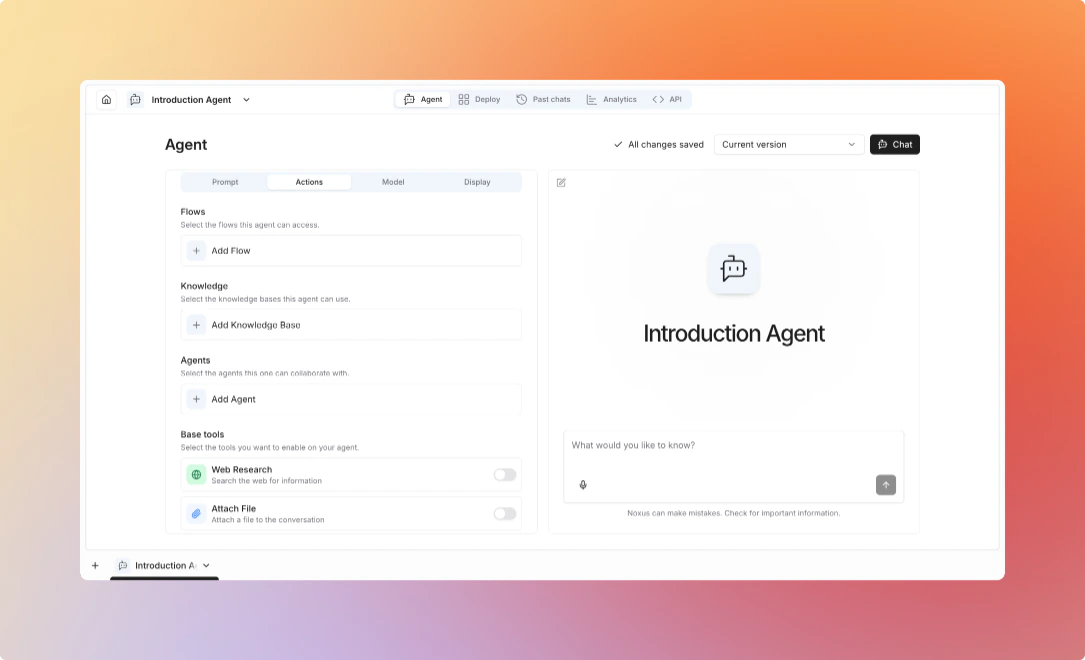
Available Tools
- Flows
- Knowledge Bases
- Web Research
- Human in the Loop
- Code Execution
- Sandbox
- Image Generation
- SQL Databases
- Data Tables
- MCP Servers
Execute flows as tools within agent conversationsUse Cases:Example:
- Execute business logic
- Integrate with external systems
- Perform complex calculations
- Trigger automated workflows
- Select which flows the agent can access
- Map flow inputs to conversation context
- Perform specific, well-defined operations
- Execute complex multi-node workflows
- Interact with external systems
- Process files or documents
Create focused flows for specific tasks, then give agents access to them.
Agent: "I'll look up that customer information for you."
→ Executes "Get Customer Info" flow
→ Receives customer data
Agent: "Here's what I found about that customer..."
Search knowledge bases for informationUse Cases:Example:
- Answer questions from documents
- Access product documentation
- Find historical information
- Provide cited responses
- Select which knowledge bases to search
- Set retrieval limits
- Define search conditions
- Answer questions based on your documents
- Retrieve domain-specific information
- Provide accurate, grounded responses
- Cite sources
Organize knowledge bases by domain (Product Docs, Company Policies, Support Articles).
User: "What's our refund policy?"
Agent: Searches knowledge base
Agent: "According to our policy document, customers can request refunds within 30 days..."
Search the web for current informationUse Cases:Example:
- Find recent news and updates
- Research public information
- Verify facts and data
- Gather competitive intelligence
- Enable/disable web research
- Set search result limits
- Configure source filtering
- Current information not in knowledge bases
- Real-time data (stock prices, news, etc.)
- Information from public sources
- Broad research across multiple sites
Web research is slower and less reliable than knowledge bases. Use for supplemental information.
User: "What are the latest AI trends?"
Agent: Searches web
Agent: "Based on recent articles, the top AI trends include..."
Escalate to humans for guidance or approvalUse Cases:Example:
- Get approval for critical actions
- Ask for clarification
- Escalate complex issues
- Collect additional information
- Define escalation criteria
- Set timeout policies
- Configure notification channels
- Get approval for critical actions
- Ask for clarification on ambiguous requests
- Escalate complex issues
- Collect additional information
Use HITL as a safety net for high-stakes decisions.
Agent: "This request requires manager approval."
→ Sends notification to human
→ Waits for response
Agent: "Your manager has approved the request. Proceeding..."
Run code to compute, transform, and analyze dataThe agent writes and executes code to do things language models are bad at on
their own — precise math, parsing/reshaping data, generating charts or files.Use Cases:
- Calculations and data transformations
- Parsing CSV/JSON and producing tables or files
- Ad-hoc analysis on data the agent has gathered
Pair with Data Tables or Knowledge Bases so the agent can pull data in, then compute over it.
A persistent, isolated shell + code environmentGives the agent a secure, network-jailed sandbox (a gVisor micro-VM) it can use
across the conversation: run shell commands, install packages, read and write
files. Unlike one-shot Code Execution, the sandbox persists so the agent can
work iteratively.Use Cases:
- Multi-step data processing and scripting
- Building an artifact (report, spreadsheet, document) step by step
- Running tooling that needs a real filesystem
The sandbox executes real code. It is isolated and network-jailed, but only grant it to agents you trust with the task.
Generate images from textLets the agent create images on request and attach them to the conversation.Use Cases:
- Illustrations, mockups, and diagrams
- Marketing/creative assets
- Visual explanations
Query a connected database in natural languageConnect one or more databases; the agent translates questions into read-only
SQL and returns the results. Schema is discovered so the agent uses real table
and column names.Use Cases:
- “How many orders shipped last week?” over a production DB
- Ad-hoc reporting without writing SQL by hand
- Grounding answers in live operational data
- Select which database connection(s) the agent may query
- Access is read-only by design
Scope the connection to the data the agent should see; queries run with that connection’s privileges.
Read and query workspace data tablesGive the agent access to your data tables — the
workspace’s structured, spreadsheet-like data — so it can look up and aggregate
rows with read-only SQL.Use Cases:
- Look up a record by key
- Aggregate/filter rows to answer a question
- Combine table data with other tools (e.g. compute over it with Code Execution)
- Select which tables the agent can access
Let the agent use tools from external MCP serversConnect Model Context Protocol servers —
GitHub, Linear, Notion, Slack, Stripe, and many more — and the agent can call
their tools directly (create an issue, read a page, look up a customer).Use Cases:
- Take actions in third-party systems
- Pull context from tools your team already uses
- Extend the agent without building a custom integration
- Bind one or more MCP server credentials to the agent
- The agent sees each server’s tools automatically
This is the reverse of the Noxus MCP server: here your Noxus agent is the client consuming an external MCP server.
Agent Deployments
Learn how to deploy and manage agents