

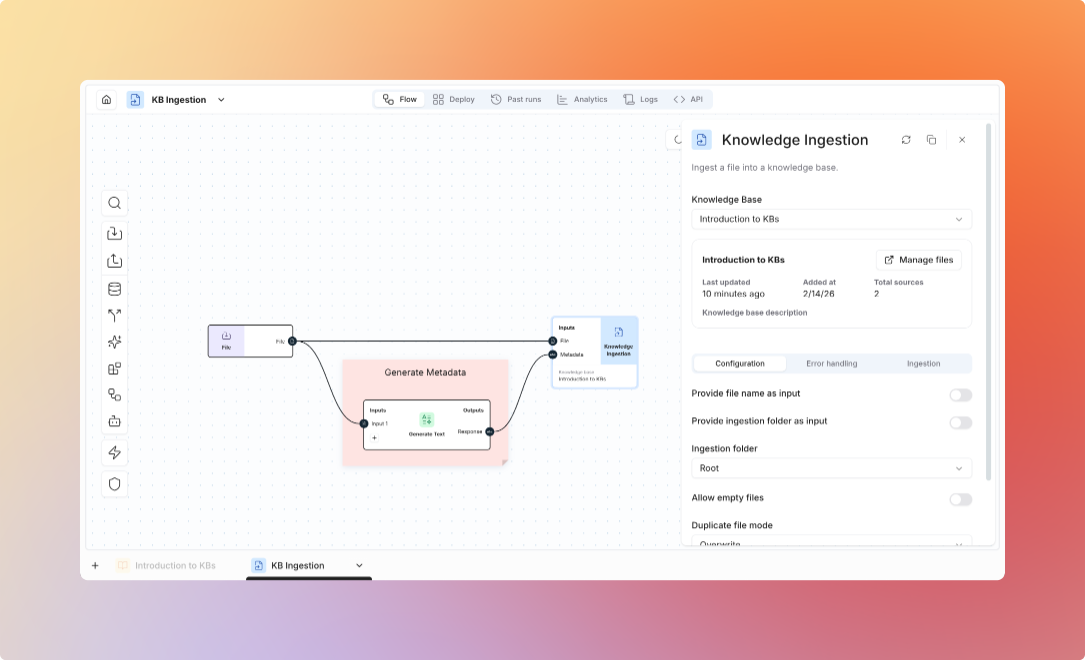
Knowledge Base Nodes
Knowledge Ingestion Node
Knowledge Ingestion Node
Upload documents to knowledge bases from flows.Use Cases:
- Automated document ingestion
- Email attachment processing
- Scheduled batch uploads
- ETL pipelines
- Knowledge base selection
- Target folder
- Metadata assignment
- Processing options
Knowledge Base Q&A
Knowledge Base Q&A
Query knowledge bases with AI-powered answers.Use Cases:
- Automated question answering
- Document-based decision making
- Information extraction
- Report generation
- Knowledge base selection
- Query input
- Folder filter (optional)
- Retrieval settings (top-K, threshold)
- Model selection
Knowledge Retriever Node
Knowledge Retriever Node
Get raw chunks without AI generation.Use Cases:
- Custom processing of retrieved content
- Relevance search only
- Building custom RAG pipelines
- Advanced analysis workflows
- Knowledge base selection
- Search method (semantic, keyword, hybrid)
- Number of chunks
- Return metadata
Common Patterns
Automated Document Ingestion
Automated Document Ingestion
Pattern: Email to Knowledge BaseUse Case: Automatically add customer support emails to knowledge baseConfiguration:
- Email integration trigger
- File type filtering
- Folder organization by sender/topic
- Notification on completion
Document Processing Pipeline
Document Processing Pipeline
Pattern: Process and IndexUse Case: Daily sync of documents from Google DriveConfiguration:
- Schedule (daily, hourly, etc.)
- Drive folder selection
- Text cleaning rules
- Knowledge base folder mapping
Intelligent Document Routing
Intelligent Document Routing
Pattern: Route by ContentUse Case: Automatically categorize and route documents to appropriate knowledge basesConfiguration:
- Content classification
- Multiple knowledge base targets
- Folder assignment rules
- Metadata tagging
Knowledge-Driven Automation
Knowledge-Driven Automation
Pattern: Query and ActUse Case: Answer questions from knowledge base, escalate if no answer foundConfiguration:
- Confidence threshold
- Escalation criteria
- Fallback responses
- Human notification
Advanced Workflows
Multi-KB Search
Multi-KB Search
Search across multiple knowledge bases:Use Case: Comprehensive answers from multiple sources
Incremental Updates
Incremental Updates
Update knowledge base with new information:Use Case: Keep knowledge base current with latest information
Integration Examples
Slack Bot with Knowledge Base
Slack Bot with Knowledge Base
Support Ticket Automation
Support Ticket Automation
Content Generation
Content Generation
Best Practices
- Ingestion
- Querying
- Maintenance
- Error Handling
- Batch uploads when possible
- Use appropriate folder structure
- Add meaningful metadata
- Validate documents before upload
Supported Files
View all supported file formats